GBA Graphics, Part 1: Bitmaps, Tiles and Palettes
The Game Boy Advance draws its 240 × 160 screen about 60 times a second. Most of that work doesn’t happen in the game’s code. A game describes what the screen should look like with different kinds of “building blocks” in video memory. The PPU (picture processing unit, the GBA’s graphics hardware) then assembles the image from them while the screen is being drawn. That’s how GBA games scroll large levels, move dozens of characters around and fade between scenes on a 16.78 MHz processor. This 3 part series explains how that hardware works, from the simplest way to show a picture to layers, sprites and rotation.
Take this frame from Shaman King: Master of Spirits. It looks like one picture, but the GBA doesn’t need a finished picture in memory. Instead, it’s put together from 4 tiled backgrounds and a few sprites, each with its own position and colors:
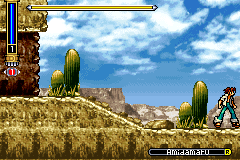
Each part of this series takes frames like this apart. This first part starts with the simplest way to fill the screen, a bitmap. Then it shows why most games use tiles instead. Part 2 stacks the layers and adds sprites, while Part 3 rotates and scales them.
All the captures and demos come from Sly, the multi-system emulator I’m working on. Sly’s debugger let’s you inspect the graphics layers, tiles, sprites, colors and much more in realtime.
For the exact details, GBATEK is the reference to keep open next to this series.
Drawing pixels directly#
The simplest way to fill the GBA’s 240 × 160 screen is to store every pixel. In a bitmap mode, the graphics hardware treats part of VRAM, the 96 KiB of video memory at 0x06000000, as one big picture. Writing a value into that memory changes a pixel. That’s really all there is to it.
The GBA port of OpenLara, an open-source Tomb Raider engine, works exactly like that. The GBA has no 3D hardware, so its renderer draws the scene in software and writes the result straight into VRAM.
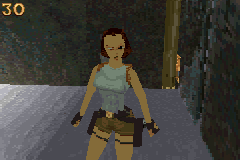
The display control register DISPCNT, at 0x04000000, decides how the screen is built. Most of its bits come up somewhere in this series:
DISPCNT
- Windows on: window 0, window 1, OBJ window bits 13–15
- Layers on: BG0-BG3, sprites bits 8–12
- Forced blank bit 7
- Sprite tile mapping bit 6
- OAM access during HBLANK bit 5
- Displayed page bit 4
- Mode bits 0–2
Modes 3 to 5 are the bitmap modes, like the one OpenLara uses. Modes 0 to 2 build the screen from tiles, which comes later in this post. A bitmap always appears on background 2, or BG2, so bit 10 has to be set as well:
| Mode | Resolution | Bytes per pixel | Pages |
|---|---|---|---|
| 3 | 240 × 160 | 2 | 1 |
| 4 | 240 × 160 | 1 | 2 |
| 5 | 160 × 128 | 2 | 2 |
A page is one complete picture in VRAM. With 2 pages, a game can display one while it draws the next frame into the other.
Modes 3 and 5 store a 15-bit color in every pixel, with 5 bits each for red, green and blue. Mode 4 halves the memory by storing a palette index instead. Pick a mode to see how much of VRAM it takes and what it looks like in practice:
240 × 160 pixels × 1 byte = 38'400 bytes per page, 2 pages. Each byte selects 1 of 256 palette colors.
All 3 modes leave the last 16 KiB of VRAM for sprite tiles, which Part 2 covers. A mode 3 image takes 76’800 of the remaining 81’920 bytes, so there’s only room for 1 page. In return, every pixel can have its own color. The Game Boy Advance Video cartridges play TV episodes this way. The Fairly OddParents frame in the mode 3 example uses 1’021 different colors, far more than a 256-entry palette could hold.
Mode 5 makes a second page fit by shrinking the picture to 160 × 128, whereas mode 4 keeps the full resolution and gives up direct color instead. The mode 5 example is a small test program I wrote that fills a page with a gradient. The rest of the screen shows the backdrop color from palette entry 0. The GBA can stretch the picture to fill the screen with BG2’s rotation and scaling registers, which Part 3 covers.
256 colors from a palette#
OpenLara uses mode 4. Each pixel is a single byte, stored one row after another, so the pixel at of the first page lives at:
That byte isn’t a color, though. It selects one of the 256 entries in the background palette at 0x05000000, where each entry takes 2 bytes. Entry is at and holds the actual 15-bit color, with red, green and blue each between 0 and 31:
Red sits in the lowest bits, so 0x001f is pure red and 0x7c00 pure blue:
Color
- Blue bits 10–14
- Green bits 5–9
- Red bits 0–4
Click a pixel below to follow its byte into the palette or pick a palette entry to highlight every pixel that uses it. You can also use the arrow keys on either image. Switch to the Game Boy Advance Video frame to compare it with mode 3, where each pixel takes 2 bytes at and those 2 bytes already are the color.
The halfword is the color itself, so there's no palette to look up.
- Pixel(120, 80)
- VRAM byte–
- Palette index–
- Palette entry–
- Color–
A palette also makes changing a color cheap, because updating one entry recolors every pixel that refers to it without touching VRAM at all.
Drawing on the hidden page#
Drawing a 3D frame takes a while. The screen keeps reading VRAM the whole time. If OpenLara drew into the page that’s on screen, you’d watch each frame being built from scratch. Mode 4’s second page avoids that: bit 4 of DISPCNT selects which page is displayed, so the game can draw into the other one and only flip the bit once the frame is finished. That’s why OpenLara’s DISPCNT keeps alternating between 0x0404 and 0x0414.
To see it happen, I saved snapshots of the hidden page in Sly between one flip and the next. Lara was turning at the time, so the frame on screen and the one being drawn are different. Switch to One page to see what the screen would show without the second page.
The hidden page still holds the frame that was on screen before the current one.
The game clears the hidden page to index 0, draws the room, then Lara and finally the FPS counter. DISPCNT also has sprites turned off, so the counter really is part of the bitmap. Flipping during VBLANK, the pause after the last visible line, keeps the page from changing halfway down the screen.
Pixels come in pairs#
Mode 4 has one catch. A pixel is a single byte, but VRAM can only be written 16 or 32 bits at a time. When a game stores a single byte with strb in the background area, the GBA duplicates it into both halves of the 16-bit halfword it belongs to. Try writing palette index 3 into a pixel both ways. Each write starts from the same original bytes:
Pick a pixel, then write palette index 3 to it.
To change a single pixel, a mode 4 renderer has to read the halfword, replace one byte and write both back, or arrange its drawing so it always writes pixels in pairs. Modes 3 and 5 avoid the problem entirely as each of their pixels is already 16 bits wide.
In the VRAM write handler, an 8-bit write to the sprite area is ignored, whereas a write to the background area is copied into both bytes of the halfword:
fn write_vram(&mut self, mut address: u32, width: Width, value: u32) {
    if width == Width::Byte {
        if self::vram_offset(address) >= self.obj_offset() {
            return;
        }

        address &= !1;
        self::write_memory(&mut self.vram, address + 1, width, value, self::vram_offset);
    }

    self::write_memory(&mut self.vram, address, width, value, self::vram_offset);
}
One line at a time#
The screen isn’t drawn all at once. The GBA takes 1’232 CPU cycles per line and 228 lines per frame: 160 visible lines followed by 68 lines of VBLANK. That’s 280’896 cycles per frame, or about 59.73 frames per second. The 240 visible pixels take 4 cycles each, but the HBLANK flag and interrupt occur later than cycle 960, around cycles 1’006-1’008. VCOUNT at 0x04000006 holds the current line. DISPSTAT at 0x04000004 can raise an interrupt for HBLANK, VBLANK or a chosen line.
Games use those interrupts to change registers between 2 lines, as do DMA transfers triggered by HBLANK on visible lines. That’s how they scroll each line differently or reshape a window. An emulator has to preserve those changes as it draws. Using only the final register values for the whole frame loses these effects. Part 3 looks at a few of them.
One loop for all 3 modes#
Sly handles all 3 bitmap modes with the same rendering path. At the start of each horizontal blank, it looks up the current mode’s width, bytes per pixel and displayed page, then converts one row of VRAM into colors. Leaving out the mosaic lookup from Part 2, the loop looks like this:
if line >= layout.height {
    return;
}

let pitch = layout.width * layout.bytes_per_pixel;
let start = layout.base + (line * pitch);
let src = &memory.vram[start..start + pitch];
for (dst, bytes) in output.iter_mut().zip(src.chunks_exact(layout.bytes_per_pixel)) {
    *dst = match *bytes {
        [0] => None,
        [index] => Some(palette_color(memory.palette, index.into())),
        _ => Some(u16::from_le_bytes([bytes[0], bytes[1]])),
    };
}
The match is the only place where the modes really differ: a 1-byte pixel in mode 4 is looked up in the palette, whereas the 2-byte pixels of modes 3 and 5 already are the color. The loop treats index 0 in mode 4 as transparent and leaves it empty (None), like everything around a mode 5 picture and below its last line. A sprite behind BG2 can show through those pixels. With no sprite or color effect involved, they get the backdrop color from palette entry 0.
When the line is put together, rgba turns each 5-bit channel into an 8-bit channel. Shifting left by 3 alone would turn the maximum of 31 into 248, so we also copy the top 3 bits into the bottom:
Bitmaps suit a game like OpenLara, which calculates every pixel anyway. For a 2D scene assembled in software, the picture takes up most of VRAM and drawing moving objects means updating their pixels. Palette changes and BG2’s rotation and scaling hardware can still change the image without rewriting those pixels.
Why tiles exist#
Most of a 2D game’s screen is made of repeating pieces: stretches of ground, bricks, grass, clouds. The tiled modes take advantage of that. Instead of storing every pixel, a game stores a set of small 8 × 8 images called tiles, plus a map that says which tile goes where. A piece that appears 50 times is stored once and placed 50 times.
The ground in the Shaman King frame is a good example. Its background covers 256 × 256 pixels, larger than the screen, so its map holds entries of 2 bytes each. Those entries refer to only 69 (nice) different tiles of 32 bytes each. The map takes 2’048 bytes and the tiles it references contain 2’208 bytes of pixel data.
Most of that reuse comes from empty space: 693 entries point at tile 0, which is completely transparent. Another 275 entries use a mirrored tile. The GBA flips those tiles when drawing them, so the game can reuse the same pixels facing the other way. More detailed scenery needs more unique pieces: the distant hills use 413 different tiles, or 13’216 bytes of tile data.
Tiles also make moving cheap. The sky in both images below can be drawn from the same tiles, map and palette. Changing its horizontal scroll from 152 to 337 accounts for the clouds moving to their later position:
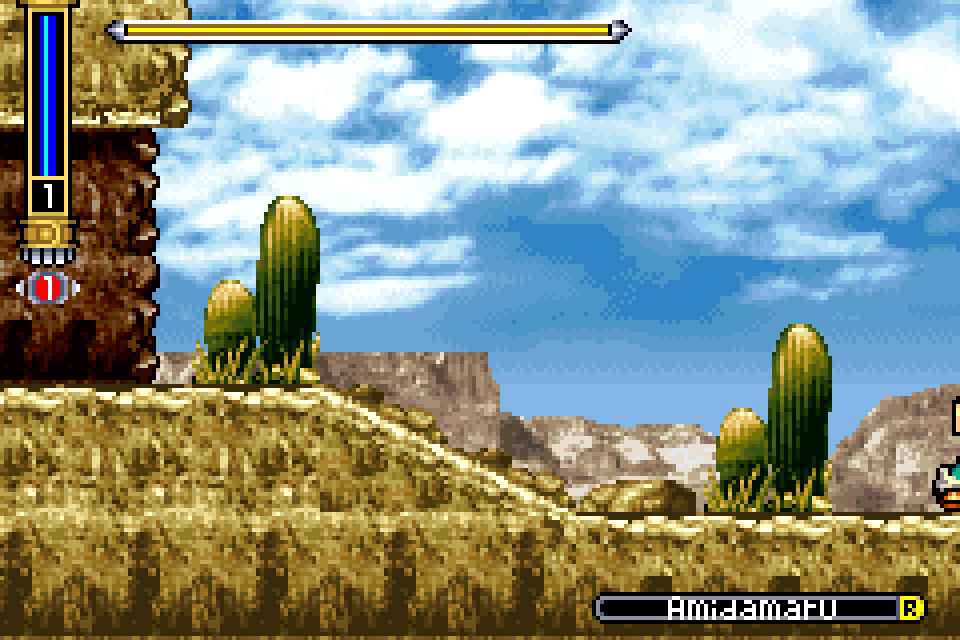
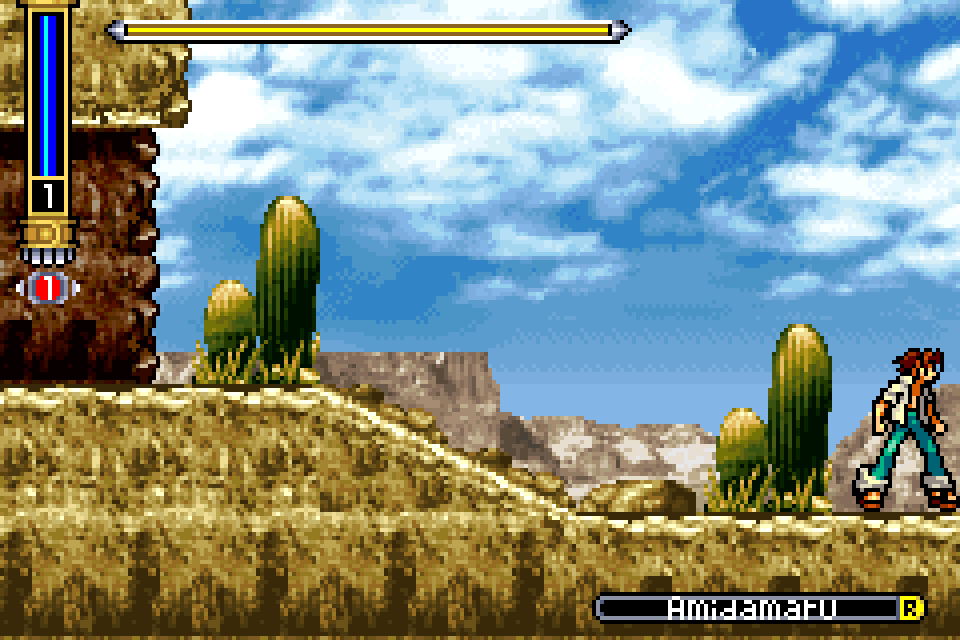
The scroll register moves the sky independently of the hills and ground, without needing a new image of the clouds.
Tiles and palettes#
A tile stores palette indices, just like the mode 4 pixels above. All 4 backgrounds in this frame use 4 bits per pixel, which fits 2 pixels into each byte and makes a tile exactly 32 bytes. The lower 4 bits hold the left pixel. A 4-bit index can only pick 1 of 16 colors, so the 256-entry background palette is split into 16 banks of 16 colors. Each map entry chooses which bank its tile uses. Index 0 is transparent in every bank, which lets the background behind it show through.
A background can also use 8 bits per pixel instead, with 64-byte tiles that index the whole palette at once.
Each background has a control register, BGxCNT, from 0x04000008 for BG0 to 0x0400000e for BG3:
BGxCNT
- Map size bits 14–15
- Wraparound, rotating backgrounds only bit 13
- Map block, in 2 KiB bits 8–12
- 8 bits per pixel bit 7
- Mosaic bit 6
- Tile block, in 16 KiB bits 2–3
- Priority bits 0–1
Priority and mosaic come up in Part 2, wraparound in Part 3. The ground layer is BG1. Its BG1CNT of 0x1e02 gives it priority 2, puts its tiles in block 0 at the very start of VRAM and its map in block 30. With 4 bits per pixel, tile starts 32 bytes later for each number. Pixel of the tile is in the byte at:
With 8 bits per pixel, a tile takes 64 bytes instead. Pixel is simply the byte at offset within the tile. Pick a tile below to see the palette index of each pixel, or pick a different palette bank to draw the same tiles with other colors:
Maps#
Each map entry is 16 bits:
Map entry
- Palette bank bits 12–15
- Vertical flip bit 11
- Horizontal flip bit 10
- Tile number bits 0–9
Entries are stored row by row in blocks of 32 × 32, which is exactly 2 KiB. Bits 8 to 12 of BGxCNT select the first block. A map that’s larger than 256 pixels in either direction needs several blocks, labeled SC0 to SC3. Each one starts 2 KiB after the previous one:
| Map size | Pixels | Blocks |
|---|---|---|
| 0 | 256 × 256 | SC0 |
| 1 | 512 × 256 | SC0 on the left, SC1 on the right |
| 2 | 256 × 512 | SC0 at the top, SC1 below it |
| 3 | 512 × 512 | SC0 top left, SC1 top right, SC2 bottom left, SC3 bottom right |
For the map tile in column and row of a map that’s pixels wide, with its map block from BGxCNT, the entry is this many bytes after the start of VRAM at 0x06000000:
BG1’s map is in block 30, at 0x0600f000. Tiles and maps share the same 64 KiB of background VRAM, so a game has to avoid overwriting one with the other unless it deliberately wants to reuse the same bytes.
The scroll registers BGxHOFS and BGxVOFS choose which 240 × 160 window of the map appears on the screen. They have 9 bits each. The map wraps around at its edges, so scrolling past the right side continues on the left. That’s how the sky’s scroll of 337 works on a map that’s only 256 pixels wide: it wraps around to 81. For a screen pixel in column on a map that’s pixels wide, the column on the map, the map tile and the column inside that tile are:
Rows work the same way with , BGxVOFS and the map’s height, which gives and .
A flipped tile uses or instead. The tile’s palette index at that pixel is transparent if it’s 0. Otherwise, it selects palette entry with 4 bits per pixel, or entry with 8.
Click any tile in the map below to decode its entry, or drag the scroll sliders to move the screen across it:
The renderer repeats this lookup for every pixel. Map sizes are powers of 2, so a mask does the modulo. text_entry_offset is the block formula from above. This excerpt leaves out the mosaic lookup from Part 2:
let bg_x = (x + bg.hofs as usize) & (width - 1);

let entry_addr = bg.ctrl.text_entry_offset(bg_x / 8, bg_y / 8, width);
let entry = TextMapEntry::from_le_bytes(
    memory.vram[entry_addr..entry_addr + 2].try_into().unwrap(),
);

let tile_addr = bg.ctrl.tile_offset(entry.tile_number() as usize, depth);
Back to the opening frame#
The ground layer is just 1 of the 4 backgrounds in the Shaman King frame. On its own, everything that isn’t ground, cacti or cliff is transparent:
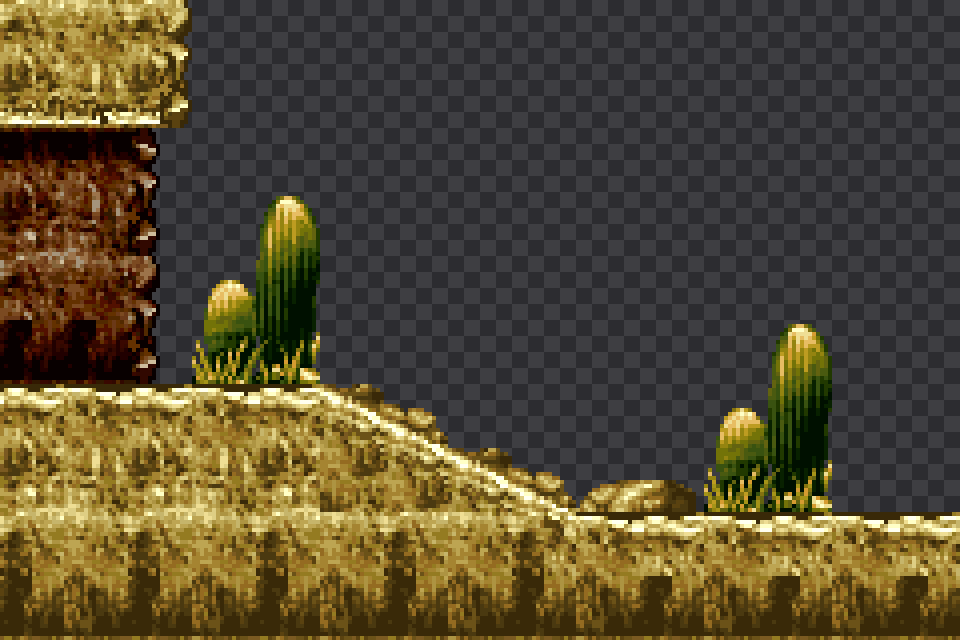
The other 3 layers work exactly the same way, each with its own tiles, map, palette banks and scroll position. Part 2 explains how the GBA decides which layer ends up in front and where the sprites fit in.